
Quick Answer
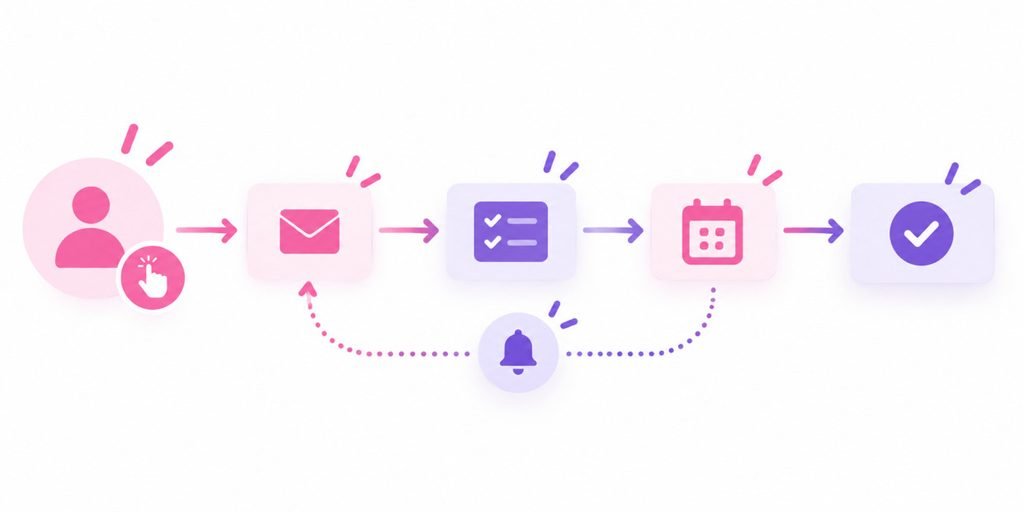
Marketing automation uses software to trigger repeatable marketing and follow-up actions based on rules, timing, or customer behavior. It can handle tasks such as welcome emails, lead routing, appointment reminders, nurture sequences, review requests, and internal notifications. A small business usually benefits when the same follow-up steps happen often enough to be repetitive, important, and easy to miss manually. Automation should support a clear process, not replace one.
What Is Marketing Automation in Simple Terms?
Marketing automation is software that carries out repeatable marketing actions automatically after a defined trigger.
Salesforce describes marketing automation as technology that manages marketing processes and multistep campaigns across multiple channels. The basic idea is simple: instead of relying on someone to remember every follow-up, the system watches for a trigger and carries out the next step according to rules you set.
A trigger might be:
- Someone submits a website form
- A caller is missed
- A prospect downloads a guide
- An appointment is booked
- A customer reaches a certain stage in your CRM
- A customer has not purchased in a defined period
- A service date or renewal is approaching
The automation might then:
- Send an email
- Send an approved text message
- Assign the lead to a team member
- Create a task
- Notify sales
- Move a contact to a new CRM stage
- Schedule a reminder
- Start a nurture sequence
That is why marketing automation is better understood as “if this happens, do that” than as a robot doing all your marketing.
The supplied question-based keyword research supports the topic as well. “How do marketing agencies leverage automation tools for efficiency?” is listed with a reported search volume of 228. That does not prove the exact title is a high-volume query, but it supports real interest in how automation is used in marketing operations.
How Is Marketing Automation Different From a CRM?
A CRM stores the relationship. Marketing automation acts on it.
Our CRM guide explains how a customer relationship management system organizes contacts, conversations, lead stages, tasks, and outcomes. Marketing automation uses that information to trigger actions without someone manually starting each one.
For example:
A new website lead enters the CRM.
The CRM records the contact.
The automation immediately sends a confirmation email.
The lead is assigned to a team member.
A follow-up task is created for the next morning.
If no appointment is booked after three days, another approved follow-up is triggered.
The CRM is the record and workflow hub. The automation is the action layer.
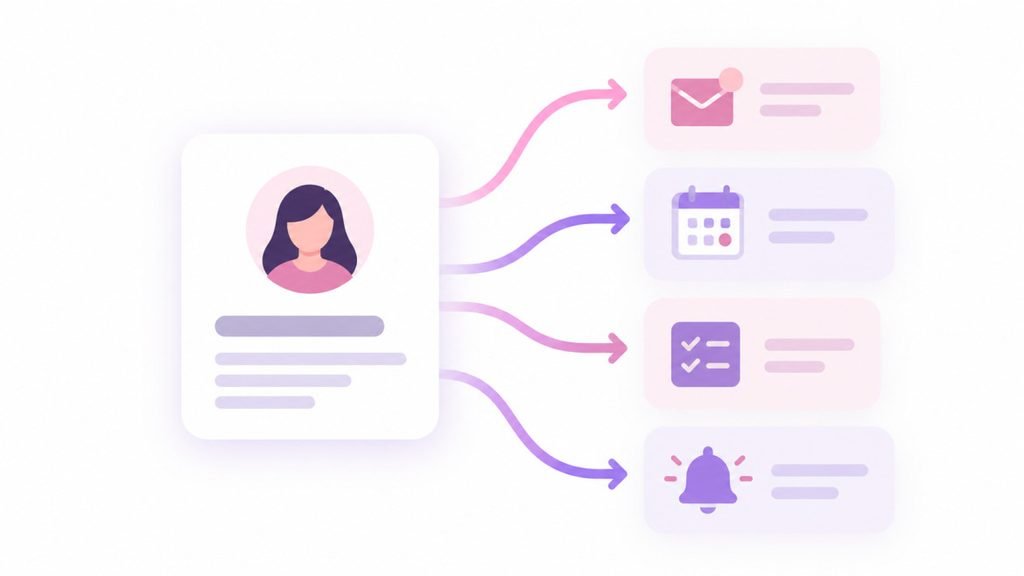
The two work best together because automation needs accurate customer data and clear stages. Without that structure, the system can send the wrong message, trigger at the wrong time, or continue contacting someone who has already converted.
This is also why buying automation software before mapping your process often creates more confusion rather than less. If nobody can explain what should happen after a lead comes in, the software has nothing useful to automate.
What Marketing Tasks Can a Small Business Automate?
The best tasks to automate are repetitive, predictable, and tied to a clear customer or team action.
Common examples include lead response. A form submission can trigger a confirmation message, create a CRM record, notify the correct person, and set a follow-up task. That helps reduce the chance that a new lead sits unnoticed in an inbox.
Lead nurturing is another common use. HubSpot’s current marketing automation guide describes behavior-triggered workflows that send more relevant follow-up based on what a contact actually did instead of sending the same message to everyone. A lead who downloads a service guide may receive different follow-up from a past customer who has not booked in a year.
Appointment-driven businesses can automate reminders and confirmations. Home-service companies can trigger follow-up after estimates. Professional services can create nurture sequences for longer decision cycles. Businesses with repeat customers can automate reactivation or maintenance reminders when timing is appropriate.
Review requests can also be automated after a completed service, provided the request remains neutral and follows the review platform’s policies. Internal workflows can be automated too: notify staff when a high-value lead arrives, create a task when an estimate has been open for several days, or alert a manager when a lead has not been contacted.
Missed-call text-back is one specific example of marketing automation, not the whole category. Our missed-call text-back guide explains how one trigger, an unanswered call, can send one immediate response. Marketing automation expands that same trigger-and-action concept across many stages and channels.
Where Does AI Fit Into Marketing Automation?
AI and automation overlap, but they are not the same thing.
Traditional automation follows explicit rules. If a form is submitted, send this message. If an appointment is booked, create this reminder. If a lead reaches this stage, notify this person.
AI can add a more adaptive layer. It may summarize conversations, classify or prioritize leads, generate draft responses, answer common questions, identify patterns, or power chat and voice agents. The automation then uses those outputs to decide what happens next.
Blog 8 covered a different type of automation: AI inside Google and Meta advertising platforms. Those systems automate bidding, targeting, creative, and delivery inside ad campaigns. Marketing automation is broader and usually focuses on what happens around the customer journey after someone interacts with the business.
NextEra’s current website reflects that distinction. Under its AI and automation services, the site lists AI Chat Agents, AI Voice Agent, Automated Follow-Up, Customer Support, and Workflow Automation. Those capabilities are useful only when they are connected to real business rules, accurate information, and a clear handoff to people when human judgment is needed.
The most important guardrail is simple: automation can execute a process quickly, but it does not automatically make the process good. Bad rules run faster when automated too.
How Do You Know If Your Business Is Ready for Marketing Automation?
You are probably ready when the same important tasks happen repeatedly and people are starting to miss them.
Signs include:
- Leads are arriving from multiple channels
- Follow-up timing depends on memory
- The same emails or texts are sent manually over and over
- Leads go cold because nobody knows who owns the next step
- Staff copy information between systems
- Appointment reminders and confirmations take too much manual time
- Managers cannot see whether follow-up actually happened
- Customers should receive different messages based on stage or behavior
Automation is less useful when the process is still undefined or happens too rarely to justify setup. If a business receives only a handful of inquiries each month and one person handles them reliably, a complex automation system may create more maintenance than value.
Start with one workflow that solves a real bottleneck. A good first automation might be:
New lead → confirmation → assignment → task → reminder
Once that works, add the next workflow.
Do not start by trying to automate the entire customer journey at once. Complex systems become difficult to troubleshoot when nobody remembers why each trigger exists.
How Should a Small Business Set Up Marketing Automation?
Map the manual process first, then automate only the steps that are clear.
A practical setup sequence is:
- Define the trigger.
- Define who the message or task is for.
- Define the action.
- Define the timing.
- Define the stop conditions.
- Decide when a person needs to take over.
- Test the workflow before turning it on broadly.
- Review performance and update it when the business process changes.

Stop conditions are especially important. If a lead books an appointment, the old “still interested?” sequence should stop. If a customer opts out of marketing texts, promotional workflows should respect that choice. If a team member has already resolved the issue, automation should not keep pushing the contact through outdated steps.
Tracking matters too. Measure whether the automation improves the outcome it was built for: faster lead response, more booked appointments, fewer no-shows, more follow-up completion, more reactivated customers, or less manual administration.
Automation should make the process easier to follow and easier to measure. If staff constantly override it, contacts receive irrelevant messages, or nobody can explain what a workflow is doing, simplify it.
Frequently Asked Questions
Q: What is an example of marketing automation? A: A website visitor submits a quote request, the CRM creates the contact, an email confirms the request, the sales team receives an alert, and a follow-up task is automatically scheduled. One customer action triggers several repeatable steps without someone manually starting each one.
Q: Is marketing automation the same as email marketing? A: No. Email is one channel that can be automated. Marketing automation can also include SMS, lead routing, CRM updates, appointment reminders, task creation, internal notifications, customer support workflows, and other actions.
Q: Do I need a CRM before using marketing automation? A: Not for every simple workflow, but a CRM becomes increasingly important as automation gets more complex. It gives the system a reliable place to store contact history, lead status, ownership, and outcomes so automations can trigger from accurate data.
Q: Is AI required for marketing automation? A: No. Many useful automations are rule-based and do not use AI at all. AI can add capabilities such as conversation handling, summarization, classification, or generation, but a simple trigger-and-action workflow can still save significant time.
Q: Can marketing automation replace employees? A: It is better used to remove repetitive tasks and make follow-up more consistent. Human judgment is still needed for complex questions, unusual situations, sales conversations, strategy, and relationship-building. The strongest systems automate predictable steps and make it clear when a person should take over.
Automate the Repetition, Not the Relationship
Marketing automation is most useful when it removes predictable manual work without making the customer experience feel disconnected. NextEra Marketing can help map the workflow, connect CRM and lead sources, build automated follow-up, and decide where AI or human involvement belongs. A conversation, not a pitch.